
Run on QGI One, Quark, QGI-Symbolic, or your own keys.
The engine is a per-run choice in the prompt bar, and each engine’s model list is what actually resolved on the fleet. Runs on your keys go straight to your vendor at their price. We add nothing. Your own key never hits a usage limit.
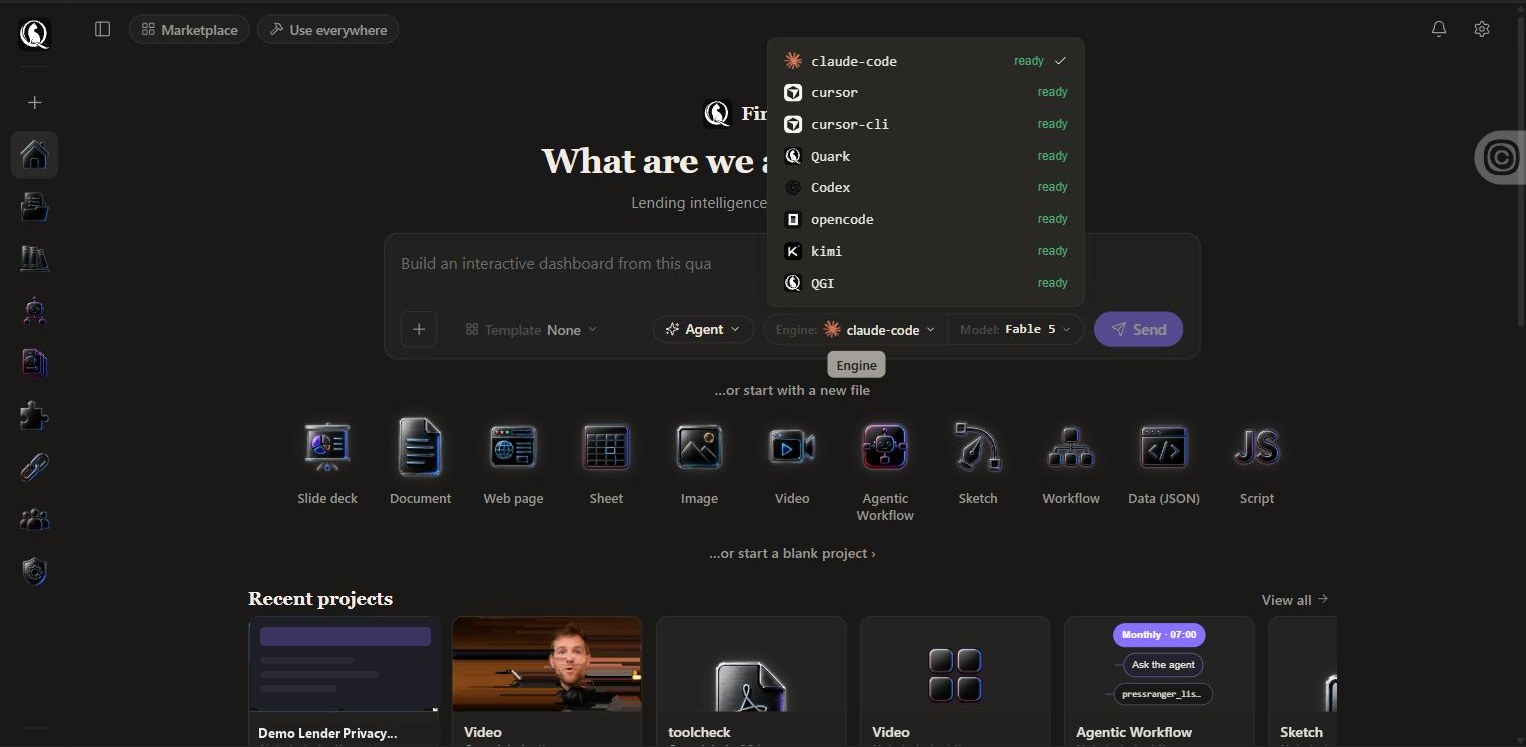
QGI engines on your plan. Everything else on your keys.
Expand a row for the model list and the plan that includes it.
| Engine | Models and what it is for | Included from | Expand |
|---|---|---|---|
| QGI Oneyour plan | The default engine. Fast and cheap. Chat is unlimited on Founder and up. | Every plan | |
| Quarkyour plan | 45 models: Gemini, GPT, Deepseek, GLM, Qwen, and the Theomax image, video and speech family. | Founder and up | |
| QGI-Symbolicyour plan | The QGI reasoning engine: everything in Quark plus the QGI-Ultra family. | Pro and up | |
| claude-codeyour key | On your Anthropic key: Fable 5, Opus 5, Sonnet 5, Haiku 4.5. | Every plan, with your key | |
| Codexyour key | On your OpenAI key: GPT-5.6 Sol, Terra, Luna and GPT-5.5. | Every plan, with your key | |
| cursor / cursor-cliyour key | On your Cursor account. | Every plan, with your key | |
| kimiyour key | On your Moonshot key: Kimi K2.7 Code, K2.7 Code Highspeed, K3. | Every plan, with your key | |
| opencodeyour key | 7 community models. | Every plan, with your key |
Images, video, speech and vision.
The media tools route to the QGI GPU fleet through Quark: Theomax Image, Image Layered and Edit for stills; Theomax Lightning and Theomax Pro for text-to-video; Theomax TTS for speech; transcription, OCR, embeddings and a vision model that can judge a rendered page. Video generation is included on Pro Max.
Different engines are good at different things.
Long autonomous builds on claude-code with your key; quick edits on cursor-cli; cheap batch drafting on QGI One; reasoning-heavy work on QGI-Symbolic; media on Quark. Choose per run, keep everything else the same: tools, files, history.
Questions.
- Which engine should I start with?
- QGI One. It is the default, it is fast and cheap, and chat on it is unlimited from Founder. Switch per run when a job needs something else.
- What does bring-your-own-key cost?
- Nothing from us. Runs on your key go to your vendor at their price, with nothing added. BYK at $8.99 a month is the studio around your keys.
- Does my key hit a usage limit?
- Never. Only your vendor’s own limits apply.
- How do I get an API key?
- From your vendor’s console: Anthropic, OpenAI, Google, Moonshot. Paste it once under Engines in the app.
Your key never hits a usage limit.
No credit card. First file in under five minutes. Cancel anytime.